
Adopt a short, living AI policy now that names an owner, an approved-tools inventory, and a strict inputs rule. Do that and you can be defensible within two to four weeks. Start by inventorying what your team already uses, ban high-risk uses until you've assessed them, and keep a version history with the help of a social media advertising checklist for small business. That last part matters more than most owners realize: a document that's clearly reviewed and updated reads as far more credible to insurers and customers than a static one nobody's touched since it was drafted.
TL;DR:
- Small businesses should inventory all AI tools in use and immediately ban unapproved tools for sensitive activities.
- The policy must specify who owns it, what tools are approved, and restrict sensitive data inputs like PII or confidential info.
- Implement a tiered risk system with strict human review for high-risk tasks such as hiring, legal, or medical content.
- Conduct a short training session and maintain logs of reviews, incidents, and updates to demonstrate reasonable oversight.
- In case of AI problems, quickly contain and document the issue, retain records for six months, and notify affected parties if necessary.
Table of Contents
- What Should an AI Policy for Small Business Actually Cover?
- Get a One-Page AI Policy Template and Quick-Start Checklist
- How Do You Roll Out an AI Policy in Four Weeks?
- How Do You Tier AI Risk and Decide What Data Is Off-Limits?
- Where Human Review Actually Happens (and What Training Looks Like)
- What Do You Do When an AI Tool Causes a Problem?
- Aligning with NIST Without Hiring a Compliance Team
- How Rooted Up Helps Solo Professionals Put This Into Practice
- Sources
What Should an AI Policy for Small Business Actually Cover?
A working policy is short, but it can't skip the load-bearing clauses. Skip one of these and the policy stops functioning as protection and starts functioning as decoration.
- Scope and owner. Name who the policy covers (all staff, contractors, interns) and who is accountable for updating it. One person, not a committee.
- Approved-tools inventory. A living list of which AI tools are sanctioned, with a lightweight process for adding new ones. Vendor terms matter here, and Microsoft's responsible AI documentation is a useful reference when you're checking what a vendor promises around data handling and safety guardrails.
- Inputs rule. Spell out what can never go into a public AI tool: customer PII, employee records, protected health information, contract terms, anything under an NDA.
- Output ownership and disclosure. Who's responsible for what the AI produces, and when you need to disclose AI involvement to a client or the public.
- Human-review threshold. Define what counts as "consequential" (hiring decisions, legal language, medical content, financial advice) and require a person to sign off before it goes anywhere.
- Prohibited uses and enforcement. State plainly what gets someone written up or terminated, not just discouraged.
- Recordkeeping. Review logs, version history, and a set review cadence, so the policy can prove it's alive.
Sensitive-data leakage is consistently the costliest and most common exposure for small teams, according to AI governance guidance from Entrepreneur. That's why the inputs rule deserves more attention than any other clause in the document.
Get a One-Page AI Policy Template and Quick-Start Checklist
You don't need twenty pages. You need one page that holds up under scrutiny. Here's the skeleton:
- Purpose (why this policy exists)
- Scope (who it applies to)
- Owner (named person, one line)
- Approved tools (a short, updated list)
- Inputs rule (what never gets typed in)
- Human-review requirement (what needs sign-off)
- Incident response (who to tell, what to do)
- Enforcement (consequences, plainly stated)
SHRM's generative AI usage policy template is a solid starting frame if you want HR language already built out for disclosure and acceptable-use clauses.
To get this live fast, work through a short checklist:
- Name the policy owner today, not "eventually."
- List every AI tool currently in use, even the ones nobody officially approved.
- Write the inputs rule first; everything else can wait a day.
- Ban unapproved tools for sensitive tasks immediately.
- Draft the one-pager using the skeleton above.
- Circulate it for a 48-hour comment window with staff.
- Publish it with a version number and date.
- Brief the team in a 15-minute meeting, not an email nobody reads.
- Set a calendar reminder for the first quarterly review.
- Log every review, even quick ones.
Healthcare providers, financial services, and anyone handling regulated data should add a documented risk assessment and loop in counsel before publishing, especially around HIPAA or hiring-related tools.
How Do You Roll Out an AI Policy in Four Weeks?
You don't need a committee or a consultant retainer to get this operational. A four-week sprint works for most solo professionals and small teams.
- Week 1: Discovery. Name the owner and inventory every AI tool currently touching your business, official or not. This is where an AI workflow audit earns its keep, because most owners underestimate what their team is already using.
- Week 2: Triage. Sort each use into a risk tier, decide what gets banned outright, and finalize the approved-tools list.
- Week 3: Publish. Release the one-page policy, set the human-review process, and confirm vendor terms for your top two or three tools.
- Week 4: Brief and log. Run a short staff training, set up a basic log for reviews and incidents, and put the first quarterly review on the calendar.
Frameworks built for small teams generally converge on this same short list of artifacts, according to ComplianceIQ's governance guide, because it's the minimum that's actually auditable.
How Do You Tier AI Risk and Decide What Data Is Off-Limits?
Not every AI task carries the same weight, and treating them all identically either overregulates harmless work or underregulates the risky stuff. A simple four-tier system fixes that.
- Tier 1 (low risk): Internal brainstorming, drafts nobody sees externally. Public, non-sensitive data only. No review required.
- Tier 2 (moderate): Marketing copy, social posts, internal summaries. No PII. Quick human read-through before publishing.
- Tier 3 (elevated): Customer-facing decisions, contract drafts, anything touching personnel data. Full human review required, logged.
- Tier 4 (high): Hiring decisions, medical or legal content, anything regulated. Human review plus documented sign-off, retained.
For tier 3 and 4 work, keep three logs: who used which tool, the actual inputs and outputs, and any configuration changes. Six months of retention is a practical default for most small businesses.
Where Human Review Actually Happens (and What Training Looks Like)
Human review isn't a formality; it's the checkpoint that catches the AI-generated line that would've embarrassed you in front of a client. Marketing copy gets a second read before publishing. Hiring tools get a human decision, never an automated one. Contract language gets a lawyer's eyes, not just a proofread.
Training doesn't need to be elaborate. A 30-minute session covering the inputs rule, the approved-tools list, and what "consequential output" means will cover most of the exposure. Stay Safe Online's small-business guidance backs this up with concrete examples of what oversight should look like in practice. Repeat it twice a year.
Keep four things on file: review logs, version history, vendor data-processing agreements, and training attendance.
Pro Tip: Store your review logs in the same folder as your policy document, not scattered across email threads. When an insurer or client asks for evidence of oversight, you want to hand over one folder, not reconstruct a timeline from Slack.
What Do You Do When an AI Tool Causes a Problem?
Speed and documentation matter more than perfection here.
- Ask immediately: did this touch personal data, and did the output reach a customer?
- Contain it: pull the content, disable the tool if needed, notify the owner.
- Preserve everything: the inputs, the output, reviewer notes, timestamps.
- Fold it into your existing incident process, don't build a separate one.
- Retain records for at least six months, longer if regulated data was involved.
- Notify affected customers or partners if personal data was exposed.
Aligning with NIST Without Hiring a Compliance Team
You don't need a compliance department to demonstrate reasonable care. The NIST AI Risk Management Framework gives small businesses a recognizable structure: a tool inventory, documented human reviews, and incident logs cover the bulk of what it asks for.
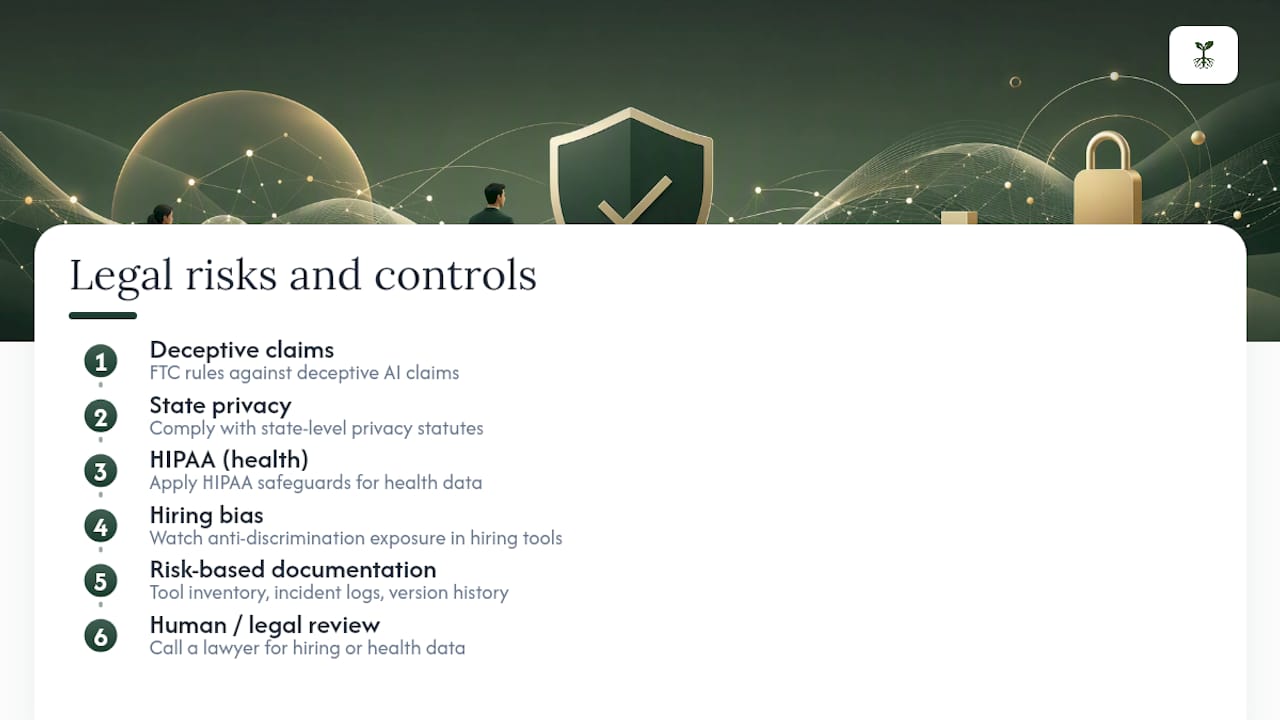
Legally, keep an eye on four areas: FTC rules against deceptive AI claims, state-level privacy statutes, HIPAA if you touch health data, and anti-discrimination exposure in hiring tools. U.S. enforcement is fragmented across agencies and states rather than governed by one federal law, so risk-based documentation matters more than chasing a single statute. Call a lawyer when hiring or health data is involved; your logs and version history are what show you acted reasonably in the meantime.
How Rooted Up Helps Solo Professionals Put This Into Practice
Most clients start in the same place: no inventory, no approved-tools list, no idea what's actually running behind the scenes. We fix that with an AI workflow audit, a one-page policy template, and ongoing monitoring built into our monthly service plans. Clients see it show up as tighter operations and stronger local visibility, without adding a second job to their week.
— Jason
Sources
- NIST AI Risk Management Framework
- Generative AI Usage Policy Template — SHRM
- AI best practices for small businesses — Stay Safe Online
- Microsoft responsible AI